

Every day your Medicare application sits in a pending queue, your practice loses revenue you won't recover. It's a brutal reality. You already know that federal forms are a nightmare, and the 2026 PECOS 2.0 cloud migration hasn't made the process any friendlier. Learning how to enroll with Medicare as a provider shouldn't feel like a high-stakes guessing game where the only prize is a rejection letter.
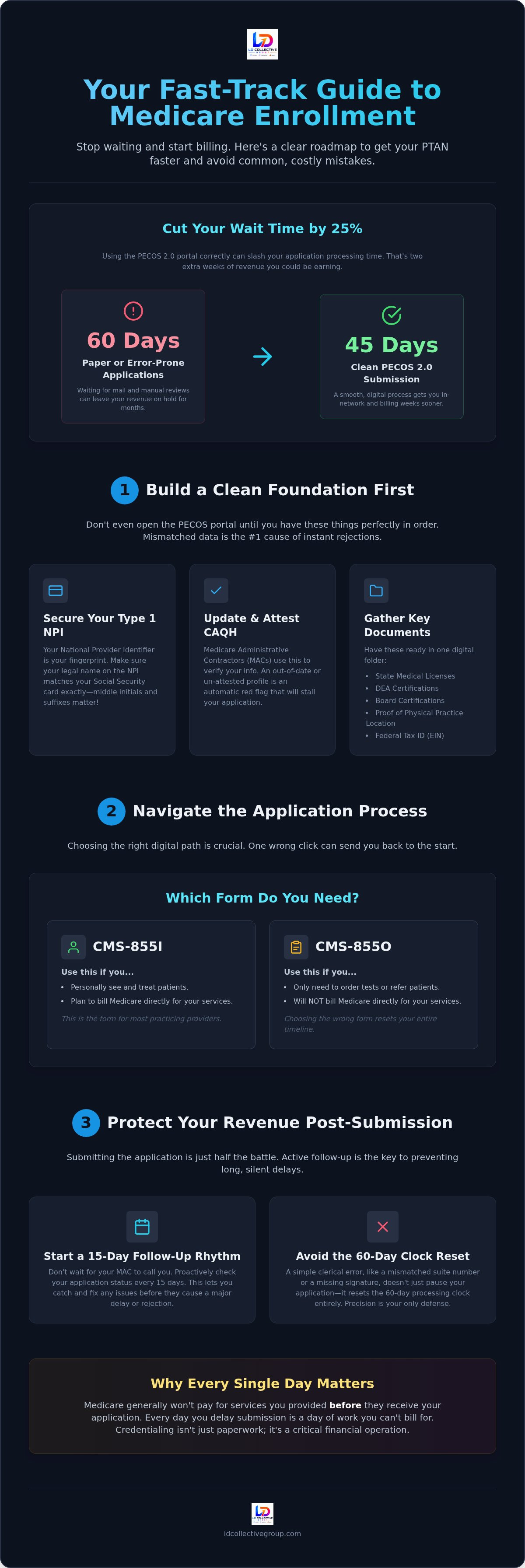
We're here to change that. You need a predictable revenue cycle and a fast track to your PTAN. This guide provides a clear, no-nonsense roadmap to master the 2026 enrollment landscape. We'll show you how to bypass common clerical traps, navigate the updated reporting windows, and cut your processing time from 60 days down to 45. Let's get you in-network and billing before the next cycle starts.
Key Takeaways
- Secure your Type 1 NPI and CAQH profile first to build a clean foundation for your application.
- Master the PECOS 2.0 portal to learn how to enroll with Medicare as a provider while cutting processing time by 15 days.
- Identify your Medicare Administrative Contractor early to avoid routing errors that reset your 60-day clock.
- Establish a 15-day follow-up rhythm with your MAC to catch pended statuses and keep your revenue moving.
Preparing Your Foundation Before Opening PECOS
Opening the PECOS portal without preparation is a recipe for a 60-day rejection loop. You need your house in order first. Medicare doesn't care about your intent; they care about matching data. If your paperwork doesn't align perfectly, your application dies on arrival. This is the first hurdle in learning how to enroll with Medicare as a provider.
The NPI and CAQH Essentials
Your National Provider Identifier (NPI) is your permanent fingerprint in the healthcare system. Secure your Type 1 Individual NPI before touching anything else. It must match your legal name on your Social Security card exactly. Middle initials matter. Suffixes matter. Don't let a typo stall your revenue.
Next, clean up your CAQH profile. Medicare Administrative Contractors (MACs) often use this for primary-source verification. If your CAQH isn't "attested" or contains expired credentials, PECOS won't save you. Log in, update your records, and hit that attest button now. It's a simple step that prevents automatic application stalls.
Gather these essentials into one digital folder before you start:
- Current state medical licenses.
- Active DEA certifications.
- Board certifications.
- Proof of your practice's physical location.
- Your Federal Tax ID (EIN) confirmation.
A P.O. Box won't work for your practice address. CMS requires a physical site where you actually see patients. If you're establishing a new location, ensure the lease is signed and the utilities are active. Understanding how to enroll with Medicare as a provider starts with these boring but vital details. Get them right, or get ready to wait.
Navigating the Medicare Enrollment Application Process
Don't touch paper. If you want to know how to enroll with Medicare as a provider without wasting months, use the PECOS portal. In 2026, online submissions through PECOS 2.0 cut processing times from 60 days to roughly 45 days. That's two weeks of extra billing you're leaving on the table if you use a mailbox. Speed is everything in credentialing.
Your practice location determines your Medicare Administrative Contractor (MAC). They're your direct line for approval and the ones who will ultimately issue your PTAN. Consult a Provider Enrollment Roadmap to confirm your specific MAC's regional requirements before hitting submit. Every MAC has slight variations in how they handle documentation, so knowing your target is non-negotiable.
Choosing Between CMS-855I and CMS-855O
Picking the wrong form is a common, expensive mistake. Use the CMS-855I if you're a practitioner who plans to see patients and receive direct Medicare payments. If you only need to order tests or refer patients to other specialists but won't bill Medicare directly, the CMS-855O is your form. Check our Provider Enrollment & Credentialing Guide for the full logic behind these selections. Choosing correctly the first time prevents a "return to provider" status that resets your entire timeline.
2026 is the year of the electronic signature. Use it. Paper signatures invite manual errors and mailing delays that you can't afford. Digital authentication is now the gold standard for getting your PTAN issued quickly. If this paperwork feels like a distraction from patient care, our provider enrollment services can take the entire load off your desk and get you billing faster.
Protecting Your Revenue from Enrollment Delays
A single clerical error can paralyze your practice's cash flow. Mismatched suite numbers or a missing signature don't just cause delays; they reset your 60-day processing clock. You can't afford to treat the question of how to enroll with Medicare as a provider like a side project. It's a high-stakes financial operation. Precision is your only defense against a "pended" status that leaves your claims in limbo.
Don't wait for your MAC to contact you. Establish a 15-day follow-up rhythm. Log into the portal or call your contractor representative to verify your application's progress. If there's a hang-up, you want to know immediately, not three weeks later when the rejection letter finally arrives. Active tracking is the difference between a 45-day approval and a four-month nightmare.
Why Every Day Matters for Your Bottom Line
Medicare generally won't pay for services rendered before they receive your application. Every day you delay submission is a day of unbillable labor. A single credentialing error can lead to months of denied claims and a complete cash flow freeze. This isn't just an administrative hurdle; it's a revenue risk. You should consider outsourcing to a provider enrollment specialist to ensure it's done right the first time. Professional oversight acts as an insurance policy against administrative revenue loss. We ensure your paperwork is accurate and your revenue cycle starts exactly when it should. Don't leave your practice's financial health to chance.
Secure Your Revenue Stream Today
Medicare enrollment isn't just a compliance task; it's the engine of your practice's cash flow. You've learned how to enroll with Medicare as a provider by securing your foundation in CAQH and navigating the updated PECOS 2.0 portal. Accuracy is your primary weapon against the 60-day rejection cycle. By establishing a strict follow-up rhythm and choosing the correct forms, you eliminate the friction that stalls most applications. Don't let administrative gaps dictate your financial health. Every day spent in a pending status is a day of lost revenue that you won't recover. You have the tools to move fast. Now, you must decide whether to struggle through the federal paperwork alone or choose a streamlined path to approval.
Stop losing revenue to paperwork delays. Trust our national enrollment expertise to keep your practice accurate, compliant, and fast. You have the roadmap; now it's time to execute and get your billing cycle moving.
Frequently Asked Questions
How long does it typically take to enroll as a Medicare provider in 2026?
Submitting through PECOS 2.0 typically results in a 45-day processing window. Paper applications still take the full 60 days or longer. When you're learning how to enroll with Medicare as a provider, remember that these timelines only hold if your submission is perfect. Any request for more information from your MAC will stop the clock and delay your revenue.
Can I see Medicare patients while my enrollment application is still pending?
You can see patients, but you can't bill them yet. Your effective date usually matches the day your MAC received your application. This means you can hold claims and submit them once your PTAN arrives. It's a calculated risk. If your application is eventually rejected, those services become unbillable, and you'll face a total loss on that labor.
What is a PTAN and why is it different from my NPI?
Your NPI is your universal identifier, but your PTAN is your specific ticket to the Medicare payment system. The NPI identifies you industry-wide. The PTAN is what your MAC uses to process claims and issue checks. Understanding how to enroll with Medicare as a provider means recognizing that your NPI is the identity, while your PTAN is the active billing tool.
What are the most common reasons a Medicare provider application is denied?
Most denials happen because of simple clerical mismatches. Using a P.O. Box instead of a physical address or missing an electronic signature will trigger an immediate rejection. Other common issues include unverified CAQH profiles or failing to report legal actions within 30 days. These small errors reset your 60-day clock. Professional oversight ensures your data matches federal records exactly to avoid these traps.

Disclaimer
The information provided in this article is for general educational and informational purposes only and reflects the author’s professional experience, research, and interpretation of provider credentialing, payer enrollment, and healthcare operations practices.
Credentialing and enrollment requirements vary by payer, health plan, government program, provider type, state, contract, and organizational structure and are subject to change. Nothing in this article should be interpreted as legal, regulatory, compliance, tax, or other professional advice, nor as an official interpretation or guidance from CMS, a state Medicaid agency, Medicare Administrative Contractor (MAC), commercial payer, accrediting organization, or other regulatory entity.
Organizations and providers should independently verify current requirements with the applicable payer, government agency, regulatory authority, accreditation organization, contract, provider manual, or other authoritative source before making credentialing, enrollment, contracting, billing, or compliance decisions.
Any opinions expressed are those of the author and do not necessarily represent the views, policies, or positions of any current or former employer, client, payer, or affiliated organization.


